How do you create YouTube content that ranks for branded searches?
YouTube videos rank for branded queries when they combine descriptive titles, full accurate transcripts, VideoObject schema, and channel branding tied to the canonical entity. The transcript is the decisive element: without it, both Google and the AI engines treat the video as an opaque file and cannot extract or cite its content.
To make a YouTube video rank for branded searches, it has to be readable by search and AI systems and clearly tied to the right entity. The steps are simple, and each one does real work.
Step 1: Write a descriptive, query-matching title
The title is the primary signal that matches a video to a search query. Include the branded term and the topic exactly as a user would type it. Generic titles like “Company Update” do not match search intent; specific ones like “[Brand] Q2 2025 CEO Briefing” do.
Step 2: Add a full, accurate transcript
This is the single most important step for both search and AI visibility. Search engines cannot watch a video; they index text. A full transcript converts the media file into text that Google can index and that AI engines can cite like a written article. Perplexity, ChatGPT Search, and Google AI Overviews all surface YouTube content regularly, and they do it by reading transcripts and captions, not the video itself.
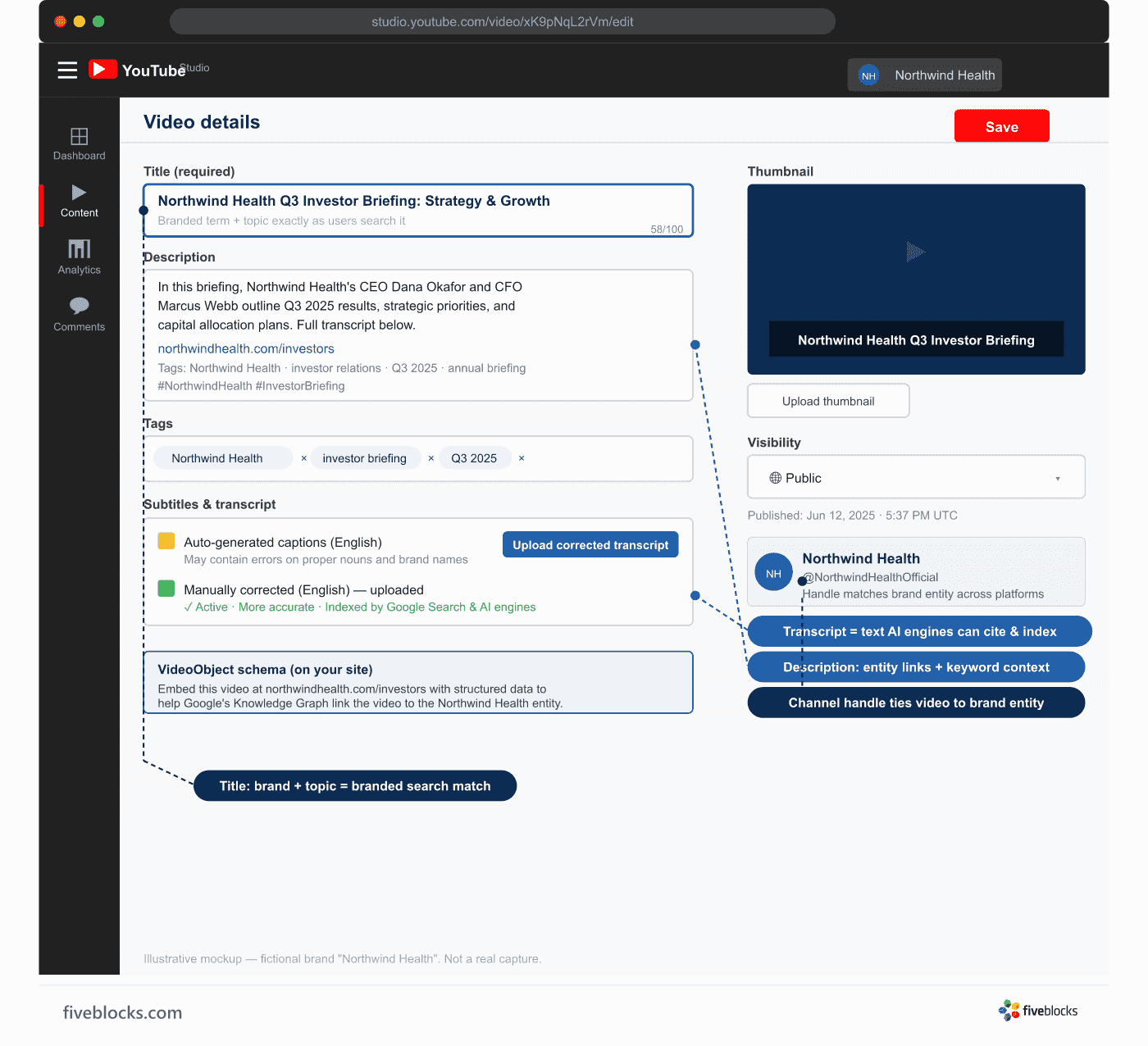
Auto-generated vs. manually corrected captions: YouTube’s automatic captions are a fine starting point, but they make real accuracy errors, especially on proper nouns, product names, and branded terms, which are the words that matter most for branded search. Manually corrected transcripts are more accurate, more reliable for AI ingestion, and less likely to produce embarrassing misattributions. Where brand precision matters, correct the transcript by hand.
Step 3: Apply VideoObject schema markup
Add VideoObject structured data to any page where the video is embedded on your own site. This tells Google what the video is, who it concerns, and what it contains, which strengthens the entity connection and enables rich results.
Step 4: Write an accurate, detailed description
The YouTube description field is crawlable text, so use it. Summarize the content with the branded terms, list the main topics discussed, and link back to the canonical entity page (corporate site, bio page). This reinforces both search indexing and AI entity resolution.
Step 5: Maintain consistent channel branding tied to the canonical entity
The channel name, handle, profile image, and About section should all match the canonical entity, using the same name, spelling, and description found across the corporate site, Wikipedia, and LinkedIn. Inconsistency creates ambiguity that can cause the systems to misattribute content or lower their confidence in the entity match.
What this achieves
- Videos hold positions in branded search results alongside owned web properties
- Transcribed content becomes citable spoken material for AI engines across Perplexity, ChatGPT Search, and Google AI Overviews
- YouTube’s domain authority extends the reach of well-structured content, since it is consistently among the most-cited domains in AI-generated answers
- VideoObject schema enables rich results and clarifies the entity connection to Google’s Knowledge Graph
Last reviewed: 20/05/2026