How do you benchmark your reputation against competitors?
Benchmark reputation against named peers by running identical query sets and AI prompts under identical conditions, applying consistent classification, and aggregating across the priority layers. The method has to be strict, same queries, same geographies and languages, same time windows, same classification criteria, or the comparison produces noise rather than insight.
Peer benchmarking is what makes reputation data actionable. Instead of asking how the client is doing in absolute terms, it asks how the client is doing against the companies that matter most to its stakeholders. Because the comparison is only useful if the method is strict, every variable is locked across the client and every peer from the start.
Step 1: Define the peer set deliberately
The peer set is defined at the start of the engagement, usually three to seven companies that are genuinely comparable on what clients care about (market position, size, geography, business model). Once set, it stays fixed, so that changes in the comparison reflect real reputation shifts rather than a change in the sample.
Step 2: Lock the methodology variables
Useful peer comparisons require identical conditions across every entity in the set:
- Same query set, the priority branded and category queries run for the client run for every peer
- Same geographies and languages: search results vary by location, so the geographic scope is locked to keep the comparison apples-to-apples
- Same time windows, data is captured in the same rolling periods to remove seasonal or news-cycle noise
- Same classification criteria: SERP feature types, sentiment categories, and source types are classified identically across every entity
Step 3: Run IMPACT for SERP benchmarking
IMPACT™ runs the priority query set against every peer in the named set, producing per-query SERP composition comparisons: which sources each competitor owns on the page, which the client owns, and how that composition has shifted over time.
Step 4: Run AIQ for AI-narrative benchmarking
AIQ™ runs identical prompts against each named peer across the eight AI engines AIQ currently tracks (ChatGPT, Copilot, Gemini, AI Overview, Perplexity, Grok, Claude, and Google AI Mode), producing a model-by-model comparison of narrative state, sentiment, source attribution, and theme coverage for each entity in the peer set.
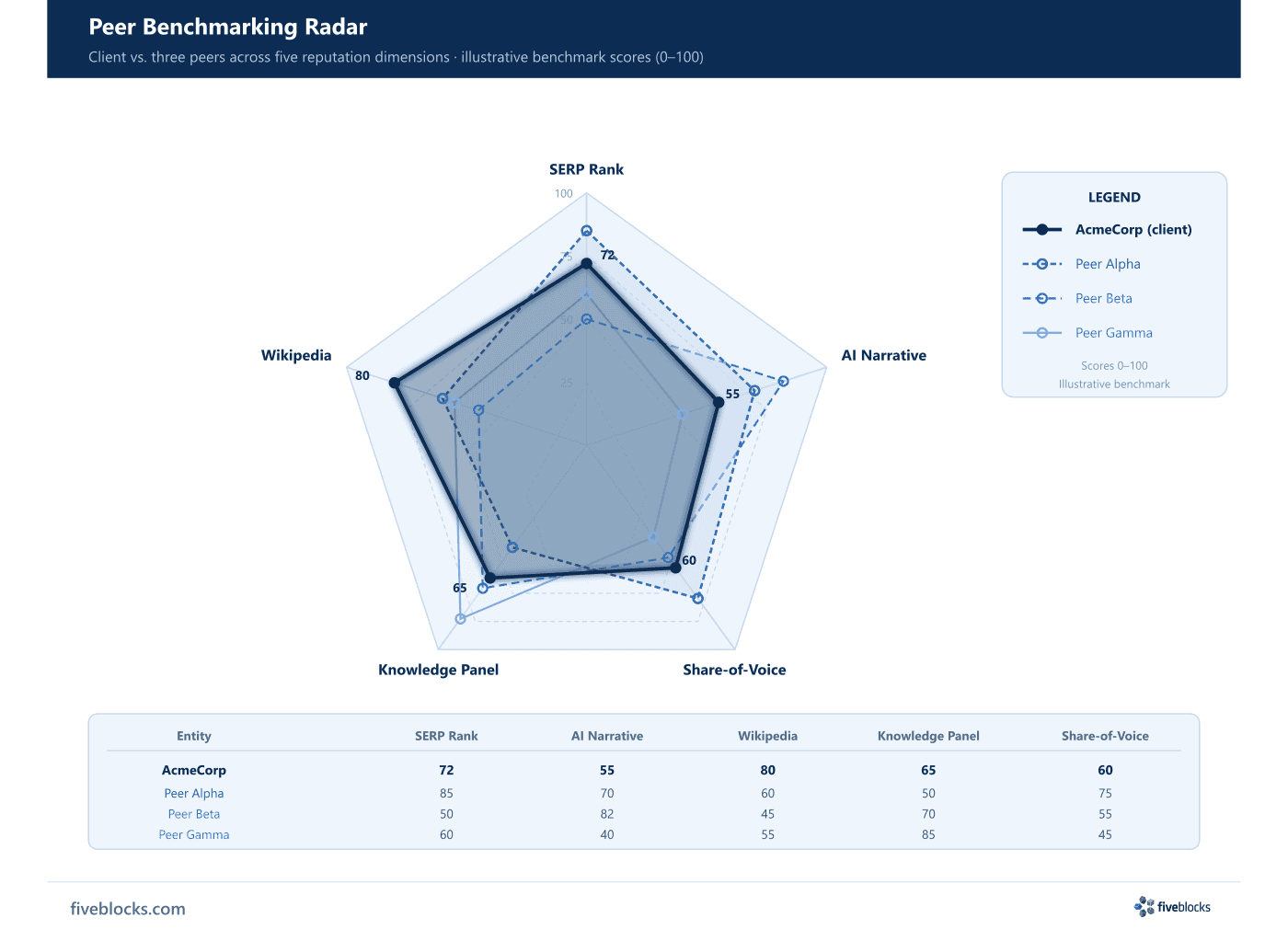
Step 5: Aggregate and read the output
The aggregate views show where the client leads, where peers lead, and where the category is uniformly weak or strong. That pattern, client advantage, peer advantage, category gap, is what drives prioritization. Most clients find peer-relative benchmarks more useful than absolute metrics, and most strategic decisions in a reputation engagement are made against peer-relative data rather than internal scores alone. The peer comparison runs continuously and feeds monthly reporting.
Last reviewed: 19/05/2026