How do site links in search results affect reputation perception?
Sitelinks are the indented secondary URLs Google displays beneath a brand's top result when it has high confidence in the site's structure and the searcher's intent. They widen the brand's footprint on the page and read as an authority signal to users. Google generates them algorithmically, with no direct submission process, but clean site architecture, BreadcrumbList schema, and consistent internal linking improve the conditions that produce them.
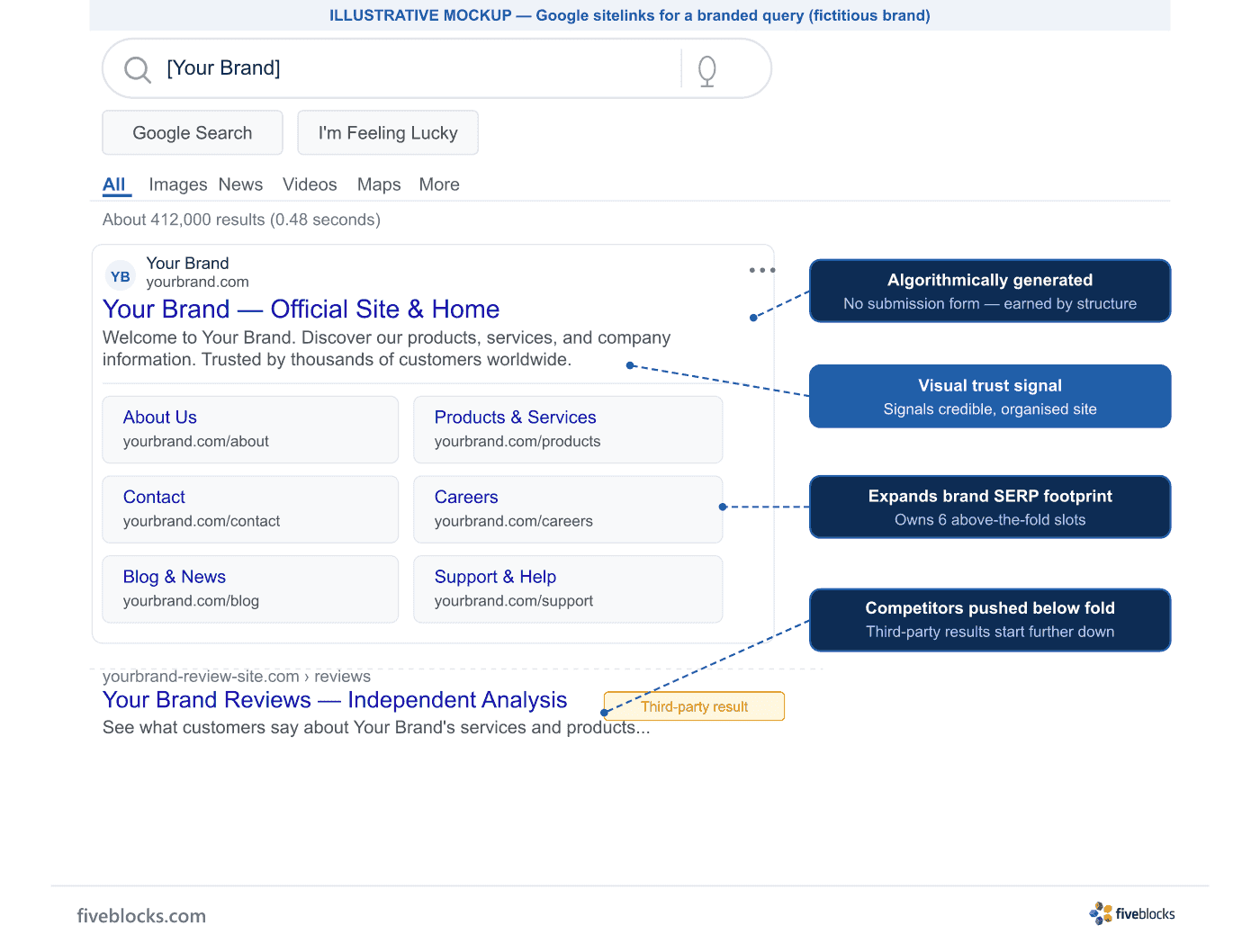
Sitelinks are the indented secondary URLs Google shows beneath a brand’s top result when the engine has high confidence in the site’s structure and the searcher’s intent. They fill a large share of the first page with the brand’s own navigation, and users read that extended result as a well-organised, trusted entity before they click anything.
What sitelinks signal to users
- Expanded SERP real estate
- Sitelinks push competing results further down the page and take over the above-the-fold space for a brand’s own name query. For reputation management, that means the brand’s own navigation, not a third-party aggregator or a negative result, is what the searcher sees first.
- Structured authority cue
- Users read the extended indented block as evidence that the site is large, credible, and well-organised. Sitelinks on a brand query are a trust signal that lands before a single click.
How Google generates sitelinks
Google’s systems analyse a site’s link structure to find shortcuts that help users reach information quickly. The process is algorithmic: there is no submission form or manual request mechanism. Google’s own documentation states: “At the moment, sitelinks are automated. We’re always working to improve our sitelinks algorithms, and we may incorporate site owner input in the future.”
Conditions that support sitelink generation
- Clear, logical site hierarchy
- A consistent, predictable URL and navigation structure lets Google’s crawl model the site’s information architecture accurately. Flat or inconsistently structured sites make that harder.
- BreadcrumbList structured data
- Google Search Central documentation confirms that breadcrumb markup indicates a page’s position in the site hierarchy and helps Google categorise the page in search results. Adding BreadcrumbList schema across the site makes the hierarchy machine-readable.
- Strong internal linking from the homepage
- Pages the homepage links prominently, the sections the site itself treats as primary, are the most likely candidates to appear as sitelinks. Consistent menu placement reinforces the signal.
- Technical hygiene over time
- When sitelinks do not appear despite sound technical conditions, the engine has not yet built enough confidence in the site’s structure. The fix is to keep the architecture and markup consistent; there is no shortcut.
What site owners cannot control
Google Search Central documentation no longer includes a way to demote specific sitelinks; the former Search Console demotion tool was retired. So reputation work aims at building the conditions that produce sitelinks with the right pages, rather than suppressing unwanted ones.
Last reviewed: 19/05/2026